



Most bakery order problems don't happen at the oven. They happen in the gaps between people — the moment an order slip leaves the front counter and lands (or doesn't) in production, the moment a decorated cake ends up on the wrong staging shelf, the moment a customer walks in at 4:45 for a pickup nobody flagged as "not started."
Those gaps are handoffs. And handoffs are where retail bakeries quietly lose money, remake product, and burn goodwill — not through incompetence, but because the information that needed to travel forward didn't travel cleanly.
This kit gives a bakery team a shared way to see those handoffs and fix the specific points where they fail. It's built as a workshop you can run internally, or as a session an association or education group could host. The framework, worksheet, matrix, and decision tree are all here — reproducible without an email signup.
One thing worth saying upfront: this is an author-created operating framework, not an industry standard, a regulatory requirement, or a validated best practice. It won't make your bakery food-safety compliant, and it doesn't replace your facility's approved procedures. It's a coordination tool. Use it as one.
Workshop Overview: Who It's For, What It Does, and What It Deliberately Isn't
Intended roles in the room (or on the call):
-
Owners and production managers who own the schedule
-
Front-of-house / order-intake staff who capture what customers want
-
Decorators and production leads who build the product
-
Packers and stagers who assemble and hold finished orders
-
Pickup and delivery coordinators who close the loop with the customer
Format: 30–45 minutes. Roughly the first third is mapping your own process, the middle is filling in the worksheet against a real recent order, and the last third is building your exception routes. It's designed to be run as a live session — in-person or virtual — with the worksheet on screen or printed.
Three observable learning outcomes. By the end, participants should be able to:
-
Map their own order-to-pickup process across its distinct stages, not as one blurry "we make it and they get it" flow.
-
Identify the required handoff information and the accountable owner at each stage — who passes what forward, and how the next person confirms they got it.
-
Establish at least one documented exception route for the failures that recur in their specific shop.
Explicit non-promotional scope. This is not a product demo. The framework runs on paper, a whiteboard, an existing POS, a shared spreadsheet, or whatever you already use. No software required. There's a disclosure section near the end about where software can help and about the commercial affiliation behind this kit — it's worth reading, because being upfront is the point.
The Order-to-Pickup Process Map
An order isn't a single event — it's a relay. Each runner has to physically hand the baton to the next, and the baton is information plus product. Drop either one and the order breaks.
This is the Order-to-Pickup Handoff Map, broken into six primary stages plus an exception loop that runs alongside all of them.
Stage 1 — Intake. The order enters the system, from any channel: walk-in, phone, online, wholesale email, catering inquiry. This is where completeness is either captured or permanently lost. An order that enters incomplete almost never gets more complete on its own — someone has to chase it later, usually at the worst time.
Stage 2 — Confirmation (specification lock). Somebody confirms the order back to the customer and to production. This is the stage most bakeries skip or handle informally, and it's the single most expensive omission. Once confirmed, the specification is considered locked unless a change is formally logged.
Stage 3 — Production consolidation. All confirmed orders for a given day or window get pulled into one view so production can be planned as a batch, not as a pile of individual slips. This is where you catch that you've got three custom cakes and a 200-cookie corporate order all due at 10 a.m. Saturday.
Stage 4 — Production / decorating. The actual build. Handoffs within this stage matter too — baked-and-cooled to decorator, decorator to finisher — but the critical outbound handoff is production signaling "this order is complete and correct."
Stage 5 — Packing / staging. Finished product gets packed to spec, labeled per your facility's procedures, and moved to a defined staging location with the order identity attached. Staging is where anonymous product goes to die — a perfect cake on the wrong shelf with no name is a lost order.
Stage 6 — Pickup / delivery closure. The customer receives the order, or the driver does, and the order is formally closed. An order isn't done when it's staged — it's done when it's confirmed in the customer's hands.
The exception loop. Running parallel to all six stages is exception handling: what happens when information is missing, a change comes in late, an item can't be made, product gets damaged, or a pickup is missed. Exceptions don't fit the clean relay, which is exactly why they cause the most damage. They get their own decision tree later.
How the Stages Connect (the Part Most Maps Miss)
The stages aren't independent. A weak Stage 1 guarantees a broken Stage 5, because the packer can't label or stage what was never specified. A skipped Stage 2 means Stage 4 builds against assumptions. Under low volume you can paper over these connections with memory and shouting across the kitchen. That stops working the moment you have more orders than one person can hold in their head.
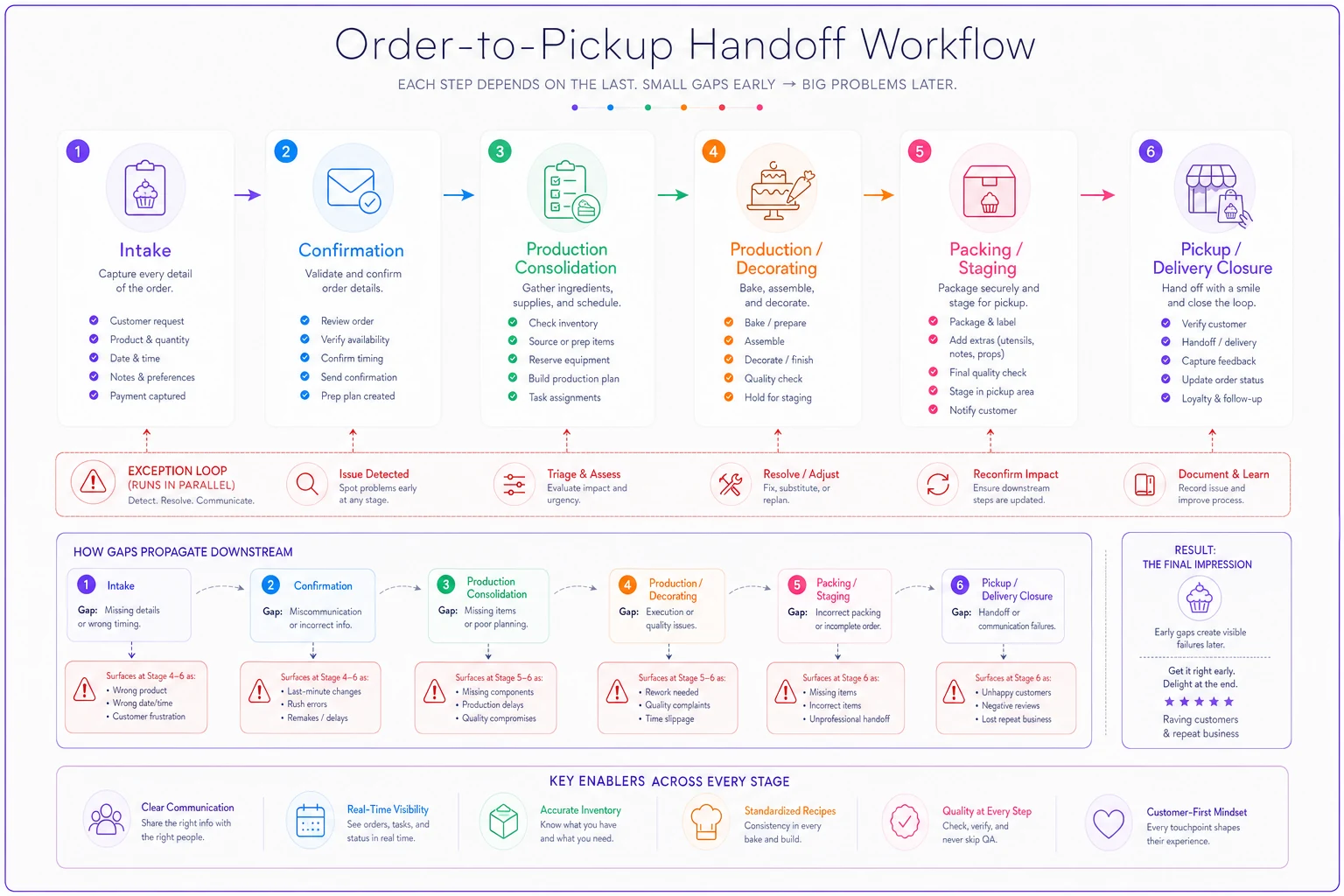
A pattern worth naming: failures almost always surface two stages downstream from where they were caused. Missing intake info doesn't hurt at intake — it hurts at packing. A soft confirmation doesn't hurt at confirmation — it hurts at pickup, in front of the customer. That delay is why teams misdiagnose the problem and blame the wrong station.
Order-Intake Completeness Checklist
If you fix only one stage, fix intake. Everything downstream inherits its quality. Print this and tape it to the phone and the POS.
An order is not considered complete until every field below is captured:
-
- [ ] Product — specific item(s), not "a cake"
-
- [ ] Quantity — per item, with units
-
- [ ] Due date AND time — a date without a time is a future argument
-
- [ ] Pickup or delivery method — and pickup location if you have more than one
-
- [ ] Customization details — flavor, size, inscription (spelled exactly as it should appear), color, design references, tiers, dietary requests
-
- [ ] Customer contact — name and a reachable phone/email, verified
-
- [ ] Payment / deposit status — paid, deposit taken, balance due, terms for wholesale/net accounts
-
- [ ] Facility-defined allergen or dietary handling flags — captured per your bakery's approved procedures
On that last point: this checklist captures that a flag exists so it travels with the order. It does not tell you how to handle allergens, prevent cross-contact, or label for compliance. Allergen handling, ingredient statements, and cross-contact controls are governed by regulation and your facility's food-safety plan. Follow your facility-approved procedures and current authoritative guidance. This kit's only job is making sure the flag doesn't get dropped between stations.
One thing most shops miss at intake: the inscription field is where custom-cake remakes are born. "Happy Birthday Jayden" versus "Jaiden" is not a small error — it's a total remake on a same-day timeline. Capturing the spelling verbatim at intake and reading it back is the cheapest quality control you'll ever run.
Role-and-Handoff Matrix
This is the accountability spine of the whole system. For every stage, three things need to be defined: who owns it, what record they pass forward, and how the next person confirms they got it. Vague ownership — "someone grabs it" — is functionally the same as no ownership.
| Stage | Accountable Owner | Required Handoff Record | Confirmation Point | Escalation Owner | Record Location |
|---|---|---|---|---|---|
| 1. Intake | Order-taker / FOH | Completed intake worksheet (all fields) | Order-taker reads spec back to customer | Shift lead | POS / order log |
| 2. Confirmation | Order-taker or manager | Locked specification + confirmation sent to customer | Customer confirms; order marked "confirmed" | Manager | Order log |
| 3. Production consolidation | Production manager | Consolidated day/window production list | Prod. manager signs off list is complete vs. order log | Owner | Production sheet / board |
| 4. Production / decorating | Production lead / decorator | "Complete & correct" mark against spec | Second set of eyes checks spec incl. inscription | Prod. manager | Production sheet |
| 5. Packing / staging | Packer | Packed, labeled order at named staging location | Packer verifies label + spec, logs staging spot | Shift lead | Staging log |
| 6. Pickup / delivery closure | Pickup/delivery coordinator | Order released + closure recorded | Customer/driver receipt confirmed, order closed | Manager | Order log |
The rule that makes this matrix hold: every stage has exactly one accountable owner. Not a team — a role. When two people are "responsible," each assumes the other handled it. That single-owner rule is what separates a matrix that works from a chart that gets ignored by week two.
Daily and Weekly Operating Routines
A handoff system isn't a one-time fix — it runs on rhythm. Four routines carry most of the weight.
-
Next-day order review (daily, end of prior day). Someone reads every confirmed order for tomorrow against the completeness checklist. Incomplete orders get chased now, while the customer is still reachable, not at 6 a.m. when nobody answers.
-
Production-plan freeze point (daily). A defined cutoff after which the next day's production list is locked. Orders that arrive after the freeze go into a clearly separate "late/exception" lane — they aren't silently dropped into the frozen plan where they'll get missed.
-
Late-change handling (as needed, against the freeze). A change to a confirmed order after the freeze is an exception by definition. It must be logged, re-confirmed, and pushed to the affected station with explicit acknowledgment. A verbal "oh, they changed it to chocolate" that never reaches the decorator is a guaranteed remake.
-
End-of-day exception review (daily). Five minutes
what broke today, at which handoff, and what almost broke. This is how a shop learns which of its handoffs is chronically weak instead of treating every miss as a fresh surprise.
Weekly, roll the daily exception notes into a quick look for patterns. If missed pickups cluster on Sundays, or inscription errors spike during holiday weeks, that's not bad luck — that's a stage telling you it needs a stronger confirmation point during peak load.
Assign the next-day review to someone who can contact customers immediately so incomplete orders are resolved before morning.
A note on freeze points: owners resist them because they fear turning away late business. In practice, the freeze doesn't reject late orders — it routes them into a lane where they're handled deliberately instead of jammed into a plan that's already committed. The bakeries that struggle most at peak are usually the ones with no freeze at all, where every plan is permanently editable and therefore never trustworthy.
Exception-Routing Decision Tree
Exceptions are where the clean relay falls apart, so they need explicit routes decided in advance, not improvised at 4 p.m. on a Saturday. Below is the tree covering the conditions that break most bakery orders. Adapt the owners and thresholds to your shop.
Condition A — Incomplete order information (discovered post-intake)
-
Can you reach the customer?
-
1. Yes capture missing fields, re-confirm, resume normal flow.
-
2. No flag order as HELD, assign to escalation owner, set a callback deadline. Do not begin production against guessed details.
Condition B — Late order change (after production freeze)
-
1. Has production started on the affected item?
-
2. No log change, re-confirm spec, push to station with explicit acknowledgment.
-
3. Yes decision goes to production manager — remake, modify, or decline the change. Communicate outcome to customer before they arrive.
Condition C — Unavailable product or ingredient
-
1. Is an approved substitute available under your facility's procedures?
-
2. Yes confirm the substitution with the customer before proceeding; log it; ensure any allergen/dietary flags are re-checked per approved procedures.
-
3. No escalate immediately; offer alternative or refund per your policy; contact customer proactively.
Condition D — Production defect / damaged product
-
1. Is there time to remake before the due time?
-
2. Yes trigger remake, re-enter at production stage, keep original due time as the target.
-
3. No escalation owner contacts customer before pickup with options (partial, alternative, timing, refund). The failure mode to avoid: customer discovers the damage at the counter.
Condition E — Missed or changed pickup / delivery
-
1. Is the product still within its intended quality/holding window per your procedures?
-
2. Yes attempt customer contact, re-stage, reschedule; log the change.
-
3. No escalate to manager for disposition per your policy; record the outcome for the weekly review.
The through-line across every branch: the customer gets contacted before the moment of failure becomes visible to them, and every exception gets logged so it feeds the weekly pattern review. An exception you handled but didn't record is a lesson you'll have to learn again.
The Printable Order-to-Pickup Workflow Worksheet
This is the core reproducible artifact. Copy it into a document, size it to one page, and adapt the fields to your shop. It's designed to be filled in per order — or per order-batch for a production window. Reproduce it freely.
> ORDER-TO-PICKUP HANDOFF WORKSHEET > Author-created operating framework — adapt to your own staffing and systems. > Version: 1.0 · Revision owner: · Date in use:
Order identity
-
- Order source (walk-in / phone / online / wholesale / catering)
__
-
- Order ID / reference
__
-
- Customer name & verified contact
__
-
- Due date & time
__
-
- Pickup or delivery (+ location)
__
Product / specification
-
- Item(s) & quantity
__
-
- Customization (size, flavor, color, design)
__
-
- Inscription (verbatim, read back) __
-
- Facility allergen/dietary flag present? (Y/N — handle per approved procedures): ____
-
- Payment / deposit status
__
Stage tracking (initial + time as each handoff is confirmed)
| Stage | Owner | Confirmed | Initials / Time |
|---|---|---|---|
| Intake complete | ☐ | ||
| Confirmation locked | ☐ | ||
| On production list | ☐ | ||
| Production complete & correct | ☐ | ||
| Packed & staged (location: ____) | ☐ | ||
| Pickup/delivery closed | ☐ |
Change status
-
- Any change after confirmation? (Y/N)
____
-
- If yes — what, when, re-confirmed by whom
__
Exception notes
-
- Condition (A–E or other)
____
-
- Action taken / owner
__
-
- Outcome & logged for weekly review? (Y/N)
__
The worksheet does double duty: filled in, it's an order tracker; blank, it's the training tool that shows a new hire the entire relay on one page. Put a version date and a revision owner on every copy so everyone knows which edition is current — a worksheet that quietly changes without a version stamp creates its own handoff confusion.
An Illustrative Scenario (Fictional)
The following is a fictional, illustrative example created to demonstrate how to use the worksheet. The bakery, people, and events are invented. It contains no measured results, customer data, or performance claims.
Imagine "Corner & Crumb," an invented three-person retail bakery that takes walk-in, phone, and online cake orders plus a handful of weekly corporate cookie orders.
A phone order comes in Thursday: two dozen cupcakes and one 8-inch birthday cake, pickup Saturday. The order-taker fills the worksheet's identity and product fields but — in a hurry — doesn't read the inscription back and leaves the allergen flag question blank. Intake looks complete on the surface. It isn't.
Friday's next-day review catches two empty boxes on the worksheet: inscription unread, allergen flag blank. Because it's caught Friday afternoon, the order-taker can still reach the customer, confirms the inscription spelling verbatim, and captures the dietary note to be handled per the shop's approved procedures. The confirmation box gets checked and the spec is locked.
Saturday morning the cake goes through production. The second-eyes check at Stage 4 catches nothing wrong because the spec was clean. The packer stages it, logs the shelf, and checks the box. At pickup, the coordinator matches the order, releases it, and marks closure.
Then the exception: the cupcakes were accidentally staged for a different Saturday order. Because staging locations were logged on each worksheet, the coordinator spots the mismatch in seconds rather than handing over the wrong box.
What the scenario demonstrates isn't a dramatic turnaround — just the mechanism: incomplete intake caught upstream by routine, a locked spec that made production trustworthy, and logged staging that made an exception recoverable. No metrics are claimed because none were measured; this is a walkthrough of the tool, not a result.
Implementation Boundaries (Read This Before You Deploy Anything)
This kit is an adaptable operating framework for coordination and handoffs. It is not, and does not substitute for:
-
- Food-safety guidance. It does not tell you how to control cross-contact, hold temperatures, or prevent contamination. Follow your facility's food-safety plan and current authoritative guidance.
-
- Allergen or labeling instruction. The worksheet only carries a flag that your facility defined. Allergen identification, ingredient statements, and labeling are governed by regulation and your approved procedures.
-
- Employment or labor-law advice. Role assignments here are operational, not legal classifications.
-
- Regulatory compliance. Using this worksheet does not create compliance with FDA, state, local, allergen-labeling, food-safety, labor, or consumer-protection requirements. Requirements vary by jurisdiction and facility.
If your final version of this material starts giving operational direction on any food-safety or allergen topic — beyond "follow your facility-approved procedures" — that content should be sourced to current primary authorities and reviewed by a qualified food-safety or allergen-control professional before use. This article does not claim such review has occurred, because it hasn't; the food-safety references here are deliberately limited to "follow your approved procedures."
Where Software Fits — and the Disclosure That Comes with Saying So
Everything above runs on paper, a whiteboard, or a shared spreadsheet. That's intentional. The framework is designed to be usable without any software, and no product is required to get value from it.
Where software can help is at scale. When order volume outgrows what one person can hold in their head, the manual version of this system starts to strain in predictable places: the next-day review takes too long, staging logs live on scraps of paper, and confirmation points get skipped under load. Operational platforms — including bakery-focused workflow tools such as Bakeryly — can carry the same handoff logic automatically: enforcing required intake fields, timestamping each confirmation point, and surfacing exceptions instead of relying on someone to remember to look. That's an optional implementation path, not a requirement, and the framework's value doesn't depend on it.
Commercial disclosure: this kit was created and is being made available by Bakeryly, a bakery operations software company. The framework, worksheet, matrix, and decision tree are deliberately vendor-neutral and work independently of any Bakeryly product. Where Bakeryly presents, funds, or promotes this material, that affiliation should be disclosed plainly — as it is here.
If this workshop is presented in partnership with any education organization or association, that host retains full editorial control over how the session is described, recorded, published, and distributed, and nothing in this kit should be read as an endorsement by any such organization.
Who This Framework Is Right For — and Who Should Wait
When this makes sense. You're past the point where one person can track every order in their head. You've had a few "the cake wasn't ready / went to the wrong customer / was spelled wrong" incidents recently. More than one person touches an order between intake and pickup. Those are the conditions where handoff discipline pays for itself quickly.
When it's overkill. A true one-person operation with a handful of orders a day doesn't need a six-stage matrix — the handoffs happen inside one head. Adopt the intake completeness checklist and skip the rest until you add staff.
Who should adapt heavily before using it. High-volume wholesale-dominant bakeries and heavy same-day custom shops have handoff profiles different enough that the stage owners and freeze points need real reworking. Use the structure, not the specific cutoffs.
Bringing It into the Shop
The fastest way to make this real is not to roll out all six stages at once. Pick the single handoff that broke most recently — usually intake completeness or staging identity — and put a confirmation point there first. Run it for a week, watch what stops slipping, then add the next stage.
A handoff system earns trust one confirmed baton-pass at a time. Try to install the whole thing overnight and it becomes the paperwork everyone quietly abandons.
The point of naming stages, owners, and confirmation points isn't bureaucracy. It's that a bakery order is a relay, and relays are won or lost at the exchange. Get the exchanges clean and the rest of the operation — the baking, the decorating, the customer moment at the counter — gets to be the part you're actually good at.
Sourcing note: This article intentionally limits food-safety and allergen content to "follow your facility-approved procedures" and makes no regulatory claims requiring external citation. If you extend this material to include specific food-safety, allergen, labeling, or temperature-control instruction, cite current primary sources (for example, the U.S. Food and Drug Administration, fda.gov, and your applicable state and local health authority) with access dates, and obtain qualified food-safety review before publication or use. No such review is claimed for this document.