

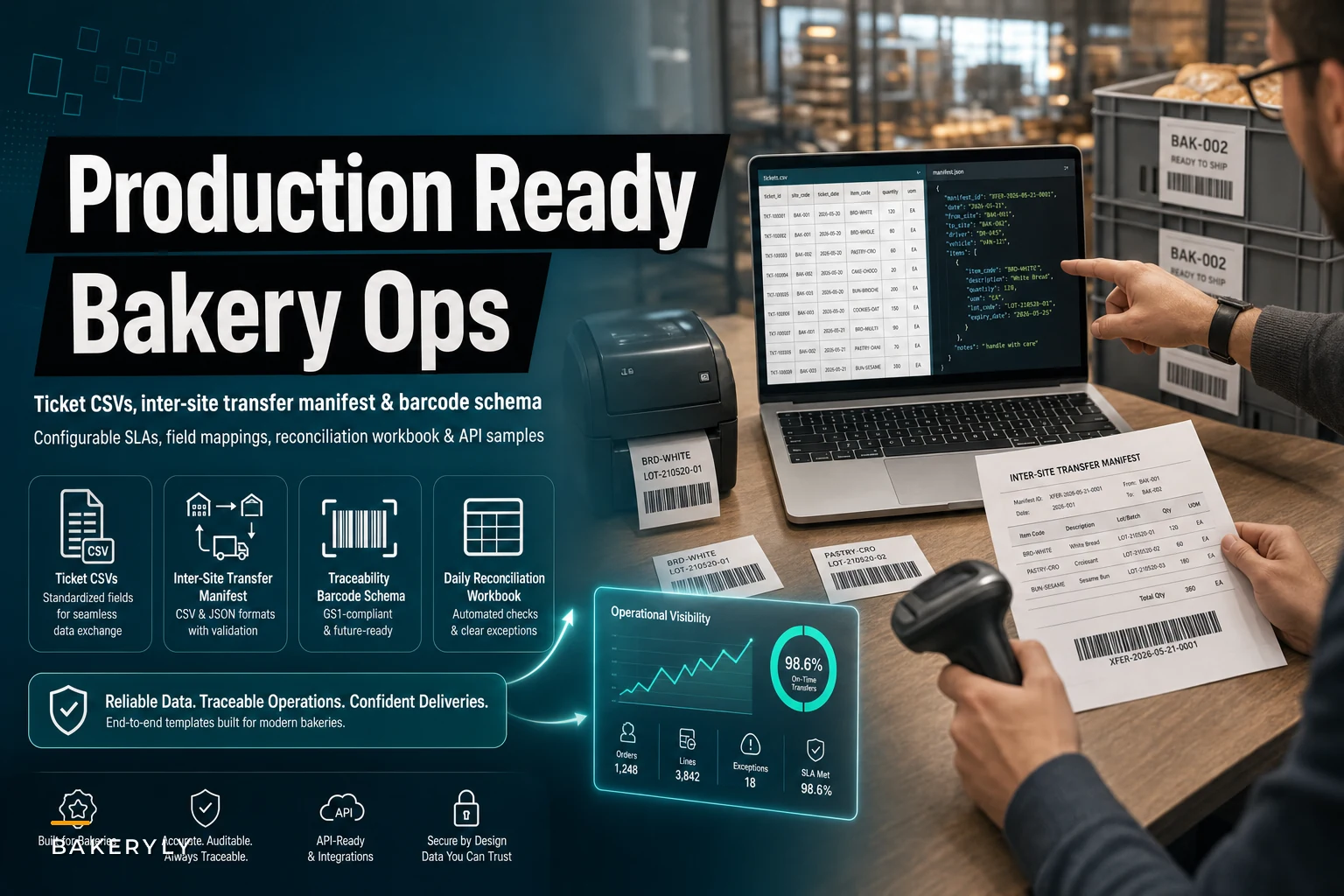

Governance documents tell you what should happen. They almost never tell you what the actual file looks like, which columns matter, or what happens when a field is blank at 5:40 a.m. and the mixer is already running. That gap is where most bakery fulfillment breaks — not in the policy, but in the artifact nobody standardized.
Below you'll find the concrete pieces: a ticket CSV that maps to your POS, OMS, and kitchen display, SLA numeric defaults you can drop in without a committee meeting, real hard‑vs‑soft reservation examples, a transfer manifest with temperature and custody fields, a lot‑code/QR data model, and a daily reconciliation workbook with formulas already wired. If you've read the multi‑channel fulfillment governance playbook, think of this as the folder of files that playbook assumes you already have.
Skipping the theory. You know why fulfillment matters. Let's build the bakery fulfillment templates you can hand to a shift lead tomorrow.
Start with the ticket CSV, because everything downstream inherits its mistakes
Most integration headaches trace back to one thing: the ticket record means something different in each system. Your POS calls it order_id. Your OMS calls it reference. The kitchen display shows a truncated version that drops the site prefix. When those three disagree, you get duplicate production, missed pickups, and a barista arguing with a spreadsheet.
The fix is boring and it works: one canonical ticket schema, and every system maps to it, not around it.
Here's the field layout that survives contact with real bakeries running POS → OMS → KDS → TMS:
| Canonical field | POS source | OMS source | KDS display | Notes |
|---|---|---|---|---|
ticket_uid | posorderid + site prefix | oms_ref | short code (last 5) | Never reused, never recycled |
site_id | register location | routing site | header badge | Must exist before ticket creates |
channel | POS/web/wholesale/sub | source system | color tag | Drives SLA and reservation logic |
priority | derived | derived | icon | See SLA table below |
promised_time | pickup slot | delivery window | countdown | The number staff actually watch |
line_sku | menu item | catalog id | item name | Maps to recipe + lot later |
qty | quantity | quantity | quantity | Integers only |
reservation_type | — | hard/soft | badge | Explained further down |
allergen_flag | modifier | order note | red banner | Pull forward, don't bury in notes |
status | fired/paid | open/fulfilled | stage | Single source of truth |
A sample row, comma‑delimited: ticketuid,siteid,channel,priority,promisedtime,linesku,qty,reservationtype,allergenflag,status CTL-2025-004871,CTL,web,P2,2025-11-14T08:15,CROISS-PLAIN,12,hard,none,open
{ "event": "ticket.created", "ticketuid": "CTL-2025-004871", "siteid": "CTL", "channel": "web", "priority": "P2", "promisedtime": "2025-11-14T08:15:00Z", "lines": [{"sku": "CROISS-PLAIN", "qty": 12, "reservationtype": "hard"}], "source": "pos", "emitted_at": "2025-11-13T19:02:11Z" }
Keep the payload flat and keep timestamps in one timezone convention. Mixed local/UTC timestamps are quietly responsible for a surprising number of "why did this ticket fire early" incidents.
Implementation note: the single most valuable rule is that ticket_uid is generated once, at the earliest system that touches the order, and travels unchanged. The failures happen when the OMS "helpfully" creates its own ID and now you're reconciling two keys for one croissant order.
Implementation note: the single most valuable rule is that
ticket_uidis generated once, at the earliest system that touches the order, and travels unchanged.
A sample event payload when the POS hands off to the OMS: { "event": "ticket.created", "ticketuid": "CTL-2025-004871", "siteid": "CTL", "channel": "web", "priority": "P2", "promisedtime": "2025-11-14T08:15:00Z", "lines": [{"sku": "CROISS-PLAIN", "qty": 12, "reservationtype": "hard"}], "source": "pos", "emitted_at": "2025-11-13T19:02:11Z" }
SLA numeric defaults you can ship without another meeting
Bakeries stall on SLAs because they treat every priority tier as a debate. It doesn't have to be. You need a small number of tiers with actual numbers attached, and those numbers need to differ by channel — a walk‑in and a scheduled corporate delivery are not the same promise.
Here's a default set that works for most single‑to‑small‑multi‑site operations. Treat these as starting values and tune after two weeks of real data.
| Priority | Typical trigger | Prep‑start SLA before promised_time | Alert if unstarted | Escalation |
|---|---|---|---|---|
| P0 | Same‑day corporate, VIP | 90 min | 60 min out | Notify manager immediately |
| P1 | Scheduled delivery | 60 min | 45 min out | Shift lead |
| P2 | Web/app pickup | 30 min | 20 min out | Station board flag |
| P3 | Walk‑in queue | on demand | n/a | none |
The number that actually matters isn't the promised time — it's the prep‑start deadline. If a 12‑dozen order is due at 8:15 and needs 45 minutes of assembly plus proof, an alert at 8:10 is useless. The workbook and KDS should count backward to when work must begin, not when it's due.
{ "sladefaults": { "P0": {"prepleadmin": 90, "alertbeforemin": 60}, "P1": {"prepleadmin": 60, "alertbeforemin": 45}, "P2": {"prepleadmin": 30, "alertbeforemin": 20}, "P3": {"prepleadmin": 0, "alertbefore_min": 0} } }
Hard vs soft reservations, with examples that aren't abstract
This is the piece that stops overselling, and it's constantly misunderstood. A hard reservation consumes committed capacity or inventory the moment it's placed. A soft reservation holds intent but can be reallocated until a cutoff.
Concrete examples:
-
Hard A corporate order for 60 boxed lunches placed Tuesday for Thursday. Those 60 come out of Thursday's assembly capacity immediately. Nothing else can claim that slot.
-
Soft A web customer adds 3 sourdough loaves to a Saturday pickup at 9 a.m. Until the Friday 6 p.m. cutoff, that's a soft hold — if bake counts shift, the system can rebalance. After cutoff, it converts to hard.
-
Soft that should be hard Subscription boxes. A lot of bakeries leave subscriptions soft and get burned when production plans against phantom capacity. Convert subscriptions to hard at the production‑lock, not at order time.
A reservation rule set, expressed simply:
IF channel = wholesale OR corporate → reservationtype = hard (at order) IF channel = subscription → soft until productionlock, then hard IF channel = web/app → soft until (promisedtime - cutoffwindow) IF channel = walk-in → no reservation, decrement on sale
The bakeries that oversell aren't usually the ones without reservation logic — they're the ones that have it but never defined the conversion moment. A soft hold with no cutoff is just an oversell with extra steps.
The inter‑site transfer manifest, with temperature and chain‑of‑custody
Once you run more than one location, transfers become the single most under‑documented operation in the building. A tray of laminated dough leaves the commissary and arrives at the café, and nobody logged the temperature, the departure time, or who signed for it. When something's off, there's no trail.
Here's a manifest schema that captures what you actually need for both food safety and accountability.
CSV version: manifestid,fromsite,tosite,departts,arrivets,vehicle,driverid,sku,qty,lotcode,departtempc,arrivetempc,custodyfrom,custodyto,sealid,status TRF-0592,CTL,CAFE-3,2025-11-14T05:10,2025-11-14T05:48,VAN-2,DRV-11,CROISS-DOUGH,240,LOT-CTL-1114-A,3.5,4.2,J.Ortiz,M.Reed,SEAL-8841,received
JSON version (same record): { "manifestid": "TRF-0592", "route": {"fromsite": "CTL", "tosite": "CAFE-3", "vehicle": "VAN-2", "driverid": "DRV-11"}, "timing": {"departts": "2025-11-14T05:10:00Z", "arrivets": "2025-11-14T05:48:00Z"}, "items": [ {"sku": "CROISS-DOUGH", "qty": 240, "lotcode": "LOT-CTL-1114-A"} ], "coldchain": {"departtempc": 3.5, "arrivetempc": 4.2, "thresholdc": 5.0}, "custody": {"from": "J.Ortiz", "to": "M.Reed", "sealid": "SEAL-8841"}, "status": "received" }
Implementation notes that matter:
-
Record temperature at both ends. A single reading tells you nothing about drift. Two readings plus a threshold field lets a system auto‑flag
arrivetempc > threshold_c. -
The
seal_idis your cheapest chain‑of‑custody control. A numbered tamper seal logged at departure and confirmed at arrival catches diversion and mishandling without any expensive hardware. -
custodyfromandcustodytomust both be filled beforestatuscan becomereceived. If either is blank, the transfer staysin_transitand shows up on the reconciliation as an open item.
A sample event payload for the TMS leg: { "event": "transfer.received", "manifestid": "TRF-0592", "arrivetempc": 4.2, "custodyto": "M.Reed", "coldchainok": true, "emitted_at": "2025-11-14T05:49:03Z" }
When a customer reports an off product, this schema lets you go from complaint → lot → manifest → temperature history → driver in about two minutes instead of a morning of guessing.
Traceability: a lot‑code / QR data model and the scan workflow
Traceability sounds like a compliance chore until the first time you need to isolate one bad batch without dumping a whole day's production. The trick is a lot code that encodes just enough to be useful, plus a QR that resolves to the full record.
Lot code structure: LOT-{site}-{MMDD}-{batch_letter} Example: LOT-CTL-1114-A Keep it human‑readable. Staff will read these off trays by hand when the scanner's dead.
The QR resolves to a data model like this: { "lotcode": "LOT-CTL-1114-A", "sku": "CROISS-DOUGH", "producedsite": "CTL", "producedts": "2025-11-14T04:20:00Z", "ingredients": [ {"item": "FLOUR-T55", "supplierlot": "SUP-88213"}, {"item": "BUTTER-EU", "supplierlot": "SUP-90114"} ], "linkedmanifests": ["TRF-0592"], "scans": [] }
The scan workflow, step by step:
-
Batch creation — the moment dough is mixed, a lot code is generated and printed. Ingredient supplier lots are attached here, not later.
-
Transfer scan — when the tray loads onto the van, the lot is scanned into the manifest, linking production to transport.
-
Receiving scan — at the destination, scanning confirms arrival and stamps the arrival temperature against the lot.
-
Fulfillment scan — when the finished item is boxed for a corporate order, the lot is tied to the
ticket_uid. This is the link that lets you go from customer back to batch. -
Recall query — if a supplier lot is flagged, you query for every lot containing
SUP-88213, then every ticket linked to those lots. Done in one lookup.
The mistake most bakeries make: they attach lot codes at the finished‑goods stage only. That tells you what you sold but not what went into it. Capture ingredient supplier lots at batch creation or the traceability chain has a hole exactly where you need it during a recall.
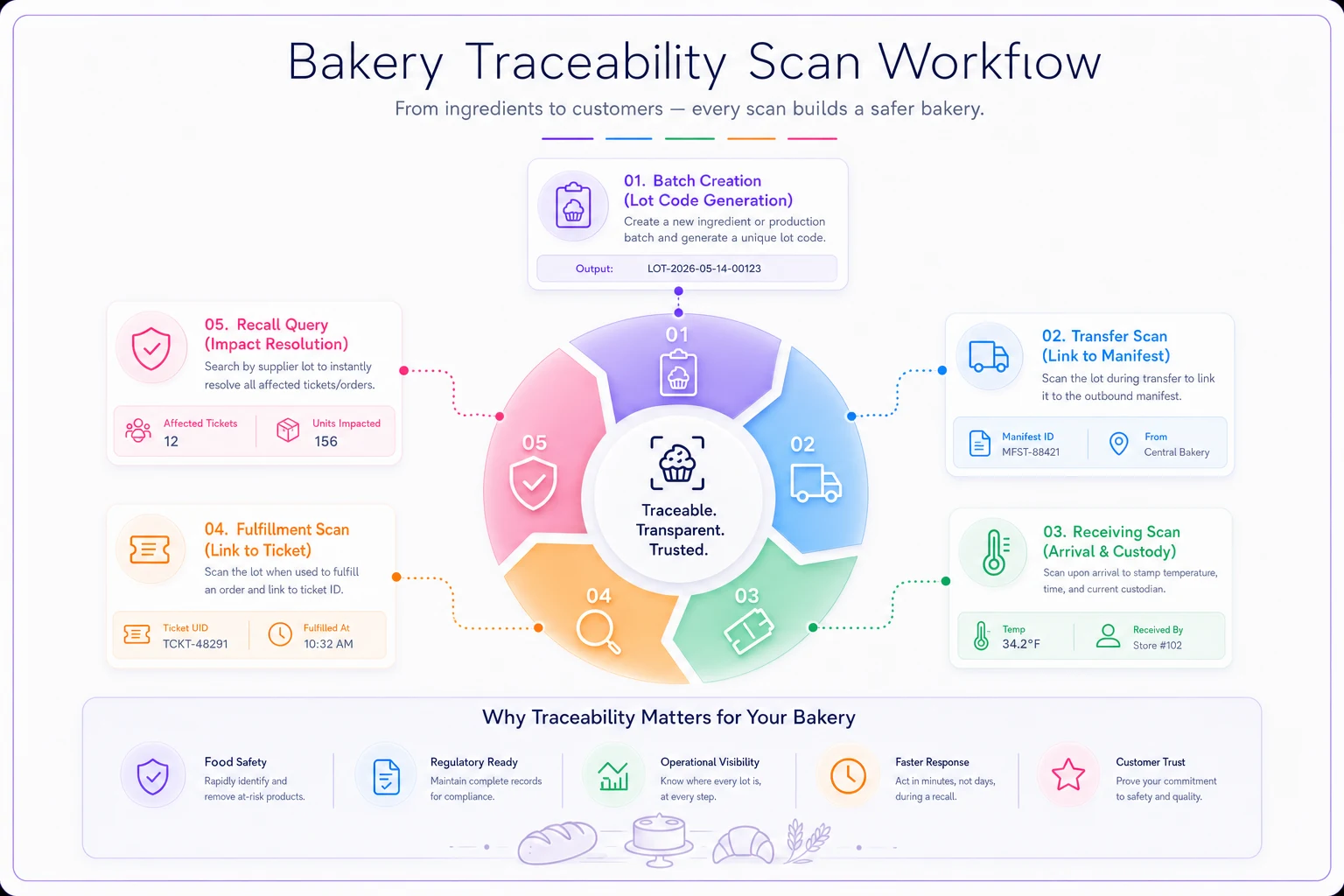
A simple diagram like this helps clarify who scans what and when during a shift change.
The daily reconciliation workbook that actually catches problems
This is the artifact most operators skip and most regret skipping. The reconciliation workbook is where produced, transferred, sold, and wasted numbers meet — and where the gaps become visible before they turn into a month‑end mystery.
Structure it as an XLSX with these tabs:
-
Production log — lot, sku, qty produced
-
Transfers — pulled from the manifest schema above
-
Sales — pulled from POS by ticket
-
Waste/donation — end‑of‑day counts
-
Reconciliation — the calculated tab that ties it together
The core reconciliation formula per SKU per site: expectedonhand = opening + produced + transfersin - transfersout - sold - waste variance = countedonhand - expectedonhand
Then wire conditional alerts:
-
Highlight
variancered ifABS(variance) > 5%of produced qty -
Flag any transfer with blank
arrivetempcorcustody_to -
Flag any lot appearing in sales but missing from the production log (a phantom sale — usually a mis‑scan or a manual override)
-
Trigger an investigation note if the same SKU shows negative variance three days running
Investigation triggers — the checklist a shift lead runs when variance flags:
-
[ ] Did a transfer get logged out but never received? (Check for
in_transitstatus) -
[ ] Was there a manual POS void or comp not reflected in waste?
-
[ ] Did production log a batch under the wrong SKU or site?
-
[ ] Is a lot code duplicated or reused?
-
[ ] Did a temperature breach cause an unlogged dump?
One two‑site bakery — one commissary, one café — was losing somewhere in the $2k–$3k range per month and couldn't pin it down. Running this reconciliation for about three weeks, the pattern surfaced pretty fast: croissant dough left the commissary at 240 units on the manifest, but café production logs consistently showed around 220 going into the oven. The gap wasn't theft — it was un‑logged proofing losses and a couple of trays that got left in the van and dumped without a waste entry. Once transfer temperatures and receiving scans were required before a manifest could close, the "mystery" shrank to normal noise and variance stayed under 3%. The fix wasn't a new policy. It was making the workbook refuse to accept an incomplete record.
When this level of structure makes sense — and when it doesn't
When it's worth it:
-
You run two or more sites and move product between them
-
You take corporate/wholesale orders that require traceability
-
You've had at least one incident where you couldn't trace a bad batch
-
Your variance shows up at month‑end instead of daily
When it's overkill:
-
Single site, walk‑in dominant, everything baked and sold same‑day in the same room. If you can eyeball the whole operation from the counter, a full manifest schema is friction you don't need yet.
Who should not start here: if you don't yet have a stable ticket_uid flowing cleanly through your POS and OMS, don't jump to transfer manifests and traceability. Fix the ticket key first. Everything else inherits from it, and building traceability on top of inconsistent order IDs just gives you very organized garbage.
Putting the files to work
These artifacts aren't meant to sit in a folder. Load the ticket CSV into your integration mapping first, drop in the SLA defaults, wire the reconciliation formulas, and run the workbook manually for two or three weeks before you automate anything. The manual run is what teaches you which alerts are real and which thresholds need tuning for your waste and proofing patterns.
The bakeries that get real value out of bakery fulfillment templates aren't the ones with the fanciest tooling — they're the ones who standardized the boring fields, made incomplete records impossible to close, and let the variance tell them where to look. Governance sets the rules. These files are what make the rules enforceable at 5 a.m. when nobody has time to think about them.
Start with the ticket schema. Get one canonical ID flowing end to end. The rest of the folder falls into place from there.