

There's a graveyard in most bakeries. Not a literal one — it's usually a shelf near the back office, or a cabinet under the front counter. That's where the label printer nobody could get to sync lives. Next to it: the tablet that was supposed to run a digital order queue, the second thermometer that logs temps to an app, maybe a fancy scale someone bought at a trade show because it "talks to the POS."
None of these were bad ideas. They were bought as gadgets, not as decisions. Nobody ran the math on what they'd actually save, and nobody thought through how they'd fit into daily flow. So they got used for a week, created friction, and quietly died.
This post isn't about telling you which tools to buy. It's about giving you a way to think through low-capex automation — scales, timers, e-forms, simple data pipelines — so you can tell the difference between something that pays for itself in two months and something that becomes an expensive paperweight.
Why cheap automations are the ones people get wrong
Big purchases get scrutiny. Nobody drops $18k on a new deck oven without a spreadsheet and three quotes. But a $120 connected scale, a $40/month e-forms subscription, a $200 label printer — those slip under the radar. They feel too small to justify a real analysis.
That's exactly why they leak money. Not through the purchase price — through the time and coordination cost of tools that half-work.
In real operations, a bad low-capex automation doesn't cost you the $40/month. It costs you the 6 minutes every morning when the connection drops and someone has to re-pair the device, across two shifts, across 26 working days. That's somewhere around 5 hours a month of frustrated staff time fighting a tool that was supposed to save 5 hours a month. Net zero, minus the aggravation.
Small automations only work if they remove a step cleanly. If they add a new failure point, they're worse than the manual process they replaced — because now you have the manual process plus the device babysitting.
The core question: what are you actually automating?
Most bakery automation falls into four buckets, and each one has a completely different ROI profile. Lumping them together is where owners go wrong.
| Type | What it replaces | Where the ROI comes from | Typical payback |
|---|---|---|---|
| Scales / portioning | Manual weighing, eyeballing | Consistency, less waste, faster prep | Fast — weeks |
| Timers / alerts | Memory, mental tracking | Fewer burned/underproofed batches | Fast, but hard to measure |
| E-forms | Paper checklists, texts, verbal handoffs | Fewer missed steps, cleaner records | Medium |
| Simple ETL / data pulls | Manual report copying | Better decisions, saved admin time | Slow but compounding |
Scales and timers pay you back in product — less waste, fewer redos, more consistent output. You feel it almost immediately.
E-forms and data pipelines pay you back in coordination — fewer dropped balls, better information flowing between shifts. That payback is real but slower, and it's the one people underestimate because you can't point at a burned tray and say "that form saved me."
The mistake is expecting a data pipeline to pay off like a scale does. It won't. It's a different clock entirely.
A short decision tree before you buy anything
Before any automation purchase — even a $50 one — run it through this. It takes five minutes and saves you from the shelf-graveyard.
-
Does it remove a step, or add one? If it replaces a manual action cleanly, keep going. If it adds a device to manage on top of the existing process, stop. Most gadget regret starts here.
-
How many times a day does the task happen? High-frequency tasks — weighing, timing, opening checklists — are where automation earns. A task you do twice a week rarely justifies a dedicated tool.
-
What's the cost of getting it wrong manually? A mis-portioned batch of croissant dough, a proof that ran 40 minutes long, a missed fridge temp log during a health inspection — these have real dollar and risk costs. Automate the expensive mistakes first.
-
Who has to change their behavior? If the automation only works when three different staff members remember to use it correctly, your real cost is training and enforcement, not the device. Factor that in before you buy.
-
Can one person break it and stall the line? Single points of failure are dangerous in a bakery running on tight morning windows. A timer that fails silently is worse than no timer at all.
If it clears all five, do the ROI math below. If it fails on #1 or #5, walk away — no matter how cheap it is.
The ROI model (simple enough to do on a napkin)
You don't need a finance background for this. The formula is:
Monthly savings = (time saved + waste reduced + errors avoided) − (subscription + babysitting time)
The two terms people forget are on the cost side. Subscription is obvious. Babysitting time is the sneaky one — the minutes spent re-syncing, troubleshooting, and working around the tool when it hiccups. Always subtract it.
Here's how it looks with a real example.
A connected portioning scale
A bakery making around 400 muffins and 200 scones a day was portioning batter by hand and feel. Yields drifted — some muffins came out heavy, which meant fewer per batch and more overbaked edges. Roughly 4–6% of batter was effectively wasted through over-portioning.
-
Ingredient waste recovered cutting over-portioning from ~5% to ~1.5% on batter costing roughly $220/day in ingredients saved close to $7–8 a day.
-
Time saved faster, more confident portioning — call it 15 minutes a morning, worth about $3–4/day in labor.
-
Babysitting cost essentially zero — it's a scale, not a network device.
So call it $10–12/day, roughly $250–300 a month in real recovery against a one-time $140 cost. Payback in under three weeks. That's a good automation. It removes a step, runs high-frequency, and can't really break the line.
Worth noting: the win came almost entirely from waste and consistency, not from time. If they'd justified the scale on labor savings alone, the numbers would've looked marginal and they might've skipped it.
Where e-forms actually earn their keep
E-forms are the most misunderstood category. Owners either over-index on them — digitizing every scrap of paper until staff drown in checklists — or dismiss them as unnecessary bureaucracy.
The sweet spot is narrow: high-consequence, easy-to-skip tasks. Fridge and freezer temp logs. Allergen station cleandowns. Opening and closing verification. The stuff that's boring, gets skipped when it's busy, and hurts badly when a skip goes unnoticed.
A paper temp log gets filled in at the end of the shift from memory — everyone knows this happens. An e-form with a timestamp and a required field changes the behavior, not just the record. That's the actual value: not the data itself, the compliance.
Roll out one form, let it become habit, then add the next.
The trap is rolling out twelve e-forms at once. Staff will start ghost-filling them the same way they ghost-filled paper — tapping through without reading. The rollout matters more than the tool. This is the same logic behind phased digital SOPs beating ad-hoc checklists — introduce one form, let it become habit, then add the next. A slow rollout of forms people actually use beats a full suite everyone ignores.
The data pipeline question (simple ETL)
This is the category where ROI is real but almost never felt directly, so it gets cut first when budgets tighten.
Pulling your POS sales into a weekly view — by product, by daypart, by day of week — is a low-capex automation. It might be a $30/month connector or a scheduled export into a shared sheet. The cost is tiny. The problem is the payoff shows up as better decisions, which are invisible until you compare them to the bad decisions you'd otherwise have made.
A typical example: a bakery that pulls its sales automatically each week starts noticing that Thursday scone sales are consistently 30% below what they bake. Without the pipeline, that pattern hides inside a busy week. With it, they cut Thursday scone production, recover the waste, and free the oven slot for something that actually sells. That's a few hundred dollars a month, quietly, ongoing — but you'd never attribute it to the $30 connector.
If you're still copying POS numbers by hand into a spreadsheet on Sunday nights, that's the first pipeline to build. There's a full walkthrough in turning dusty POS reports into weekly decisions — the automation is the easy part; the discipline of actually reading it weekly is where the value lives.
When this makes sense — and when it doesn't
When low-capex automation is clearly worth it:
-
The task happens multiple times a day, every day
-
Getting it wrong costs money or creates risk — waste, compliance, safety
-
It removes a manual step without adding a fragile new one
-
One or two people can own it without company-wide behavior change
When it's a bad idea:
-
You're automating a task that happens rarely
-
The tool depends on a flaky connection during your busiest window
-
The "savings" are entirely soft — time that just gets absorbed into other slack
-
It requires everyone to change habits simultaneously with no rollout plan
One group that should hold off entirely: if your underlying process is still undefined — no agreed portioning method, no set temp-check schedule, no standard closing routine — automating it just locks in the chaos faster. Fix the process on paper first. Automation amplifies whatever system you already have; it doesn't create one from scratch.
How the pieces connect as you grow
At one location, these automations are conveniences. At three locations, they become the only way you know what's actually happening.
A simple flow illustrates how tools shift from local conveniences to a remote operational nervous system as you scale.
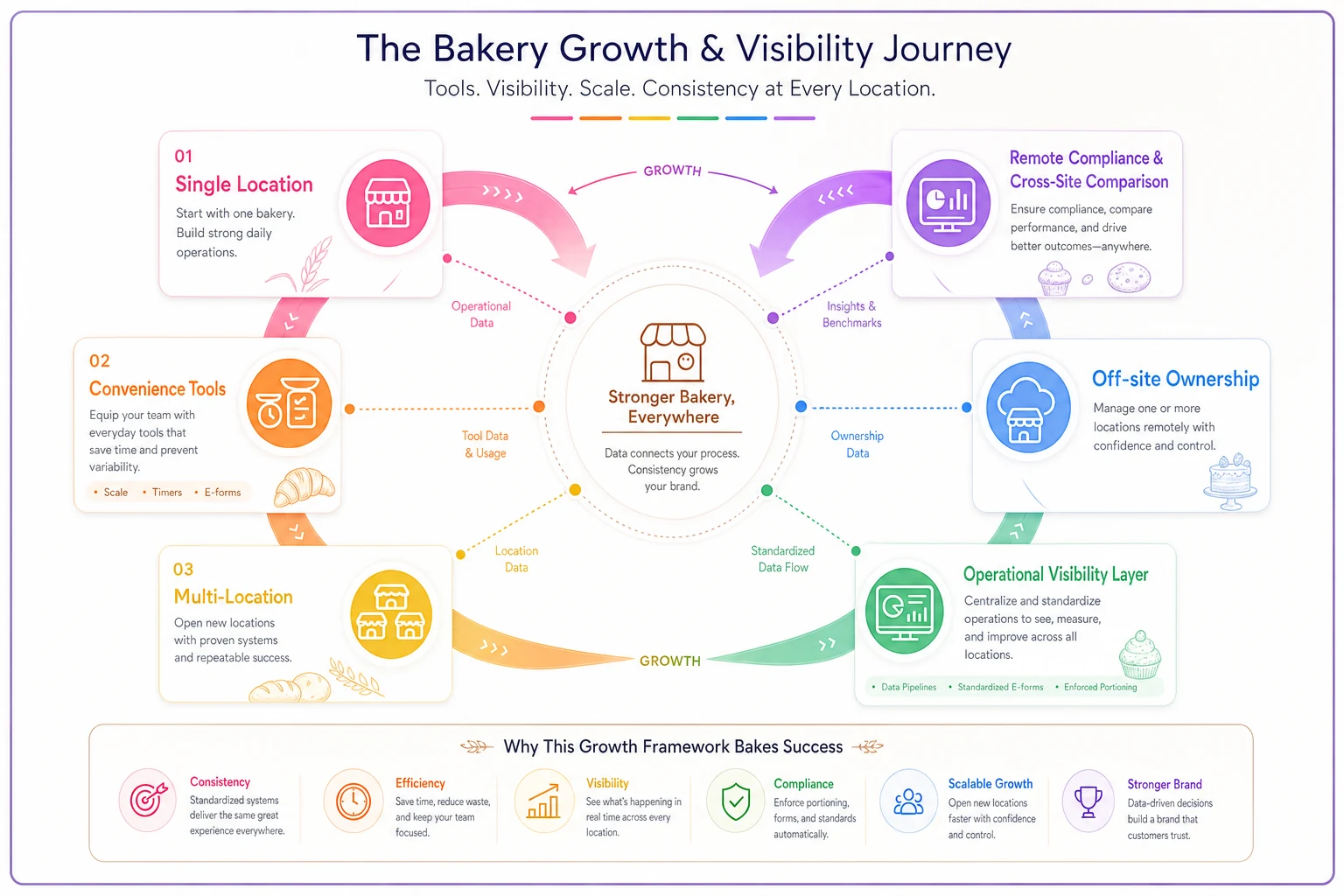
A scale that enforces portion weights isn't just about waste at a single shop — it's how you keep muffin sizes consistent across two cafes so a regular customer doesn't notice the difference. An e-form isn't just a temp log — it's how an owner who's now off-site knows the freezer was checked without driving over. A data pipeline isn't just a weekly report — it's how you compare Site A against Site B and catch the one that's quietly overproducing.
The individual tools each pay for themselves in small ways. But as you scale, the ones that survived your ROI filter become the nervous system that lets you run something you can no longer see with your own eyes. The gadgets that failed the filter? You'll be glad they never made it past the front counter.
Bringing it together
The difference between a smart automation and a shelf ornament isn't the price tag or how modern it looks. It's whether it removes a real step, runs often enough to matter, and doesn't quietly introduce a new way for the morning to fall apart.
Run every purchase — even the cheap ones — through the decision tree. Do the napkin math, and don't forget to subtract the babysitting time. Automate your expensive, high-frequency mistakes first: portioning waste, missed temp logs, blind production numbers. Leave the slow-payback data work for once your daily flow is stable. And whatever you buy, roll it out one thing at a time so it becomes habit instead of clutter.
Cheap tools don't sink bakeries. Cheap tools bought without a decision behind them do — a little at a time, in wasted minutes and half-used subscriptions nobody remembers to cancel.