

A promo goes out at 8am. By 8:45 the online store has taken 62 orders for the "limited" brown butter cookie box you priced at $18. Problem is, your production sheet only had room for 45 that day, and 20 of those were already spoken for by standing wholesale. So now you've sold 62, you can make maybe 25, and someone on the floor is about to spend their whole afternoon writing apology emails and processing partial refunds.
That gap — between what the website says is available and what the kitchen can actually produce — is where most bakery promo damage happens. Not in the marketing. In the handoff.
This is a narrow problem with a specific fix: an allocation template that connects online availability flags to real production load, auto-closes items when capacity is hit, fires the right notifications, and gives you a clean way to reconcile the preorders that still slip through.
Why the website and the kitchen drift apart
The website doesn't know what the oven is doing. That's the whole issue in one sentence.
Your online store tracks inventory as a number — 100 units, decrementing by one each time someone checks out. But a bakery doesn't have 100 units sitting on a shelf. It has capacity to make a number of units, and that capacity is shared across channels, shifts, and SKUs that compete for the same mixer, the same proofer, the same 6am labor window.
So when you run a promo, the store happily sells against a number you typed into a field last week, while the production side has no idea a surge is coming until the order list prints. The flag says "available." The kitchen says "we're already at 92% of Tuesday."
-
Static inventory counts that were set once and never tied to daily capacity, so the number is fiction the moment wholesale changes.
-
Shared ingredients — a croissant promo quietly eats the butter and lamination time your morning viennoiserie needs, but neither the site nor the count knows they're linked.
-
No cutoff logic, so orders keep flowing in after the point where you physically can't add them to a batch.
The marketing team — or you, at 8am, sending the email — is working off a completely different picture than the person who has to bake the thing.
The core idea: allocation, not inventory
Stop thinking in units on a shelf. Start thinking in allocation buckets against daily production load.
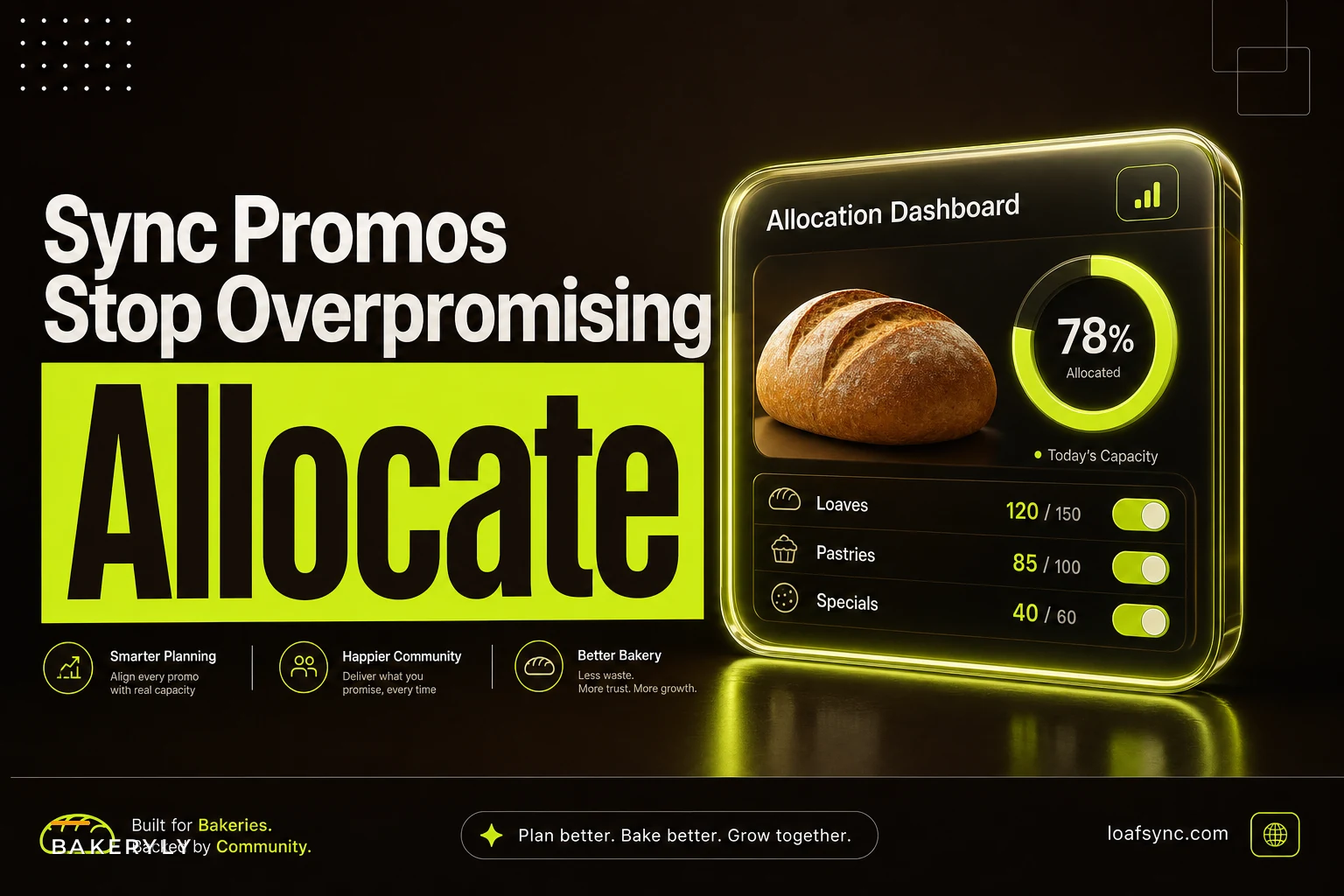
An allocation is a reserved slice of your production capacity for a specific SKU on a specific day. When you build a promo, you're not saying "we have 100 cookie boxes." You're saying "we're allocating 30 boxes of Tuesday's cookie capacity to the online promo, holding 20 for the counter, and the rest of the oven belongs to standing orders."
The template below is what that looks like in practice. This is the sheet the promo runs against — and the thing your online availability flag should read from, not a static count.
| SKU | Daily production ceiling | Committed (wholesale/standing) | Reserved (counter) | Promo allocation | Sold online | Remaining | Flag status |
|---|---|---|---|---|---|---|---|
| Brown butter box | 45 | 20 | 8 | 17 | 14 | 3 | OPEN |
| Sourdough loaf | 60 | 30 | 15 | 15 | 15 | 0 | AUTO-CLOSED |
| Cinnamon rolls (6pk) | 24 | 6 | 6 | 12 | 7 | 5 | OPEN |
| Almond croissant | 80 | 40 | 20 | 20 | 19 | 1 | LOW — WARN |
The key column is Remaining, and the key rule is: the online flag reads Remaining, not the ceiling. When Remaining hits zero, the flag flips to closed automatically. When it drops to a threshold you set (say, 2), it warns you before it closes.
This is the same discipline behind time-based order-batching rules — you're deciding in advance how much of a fixed capacity each channel gets, instead of letting demand fight over it live.
Auto-close rules that actually hold
"Auto-close" sounds simple until you realize there are three different moments a SKU needs to close, and most bakeries only handle one of them.
1. Allocation exhausted. The obvious one — promo allocation is fully sold, flag closes. This is a hard stop tied to the Remaining column above.
2. Production cutoff time reached. Even if you have allocation left, there's a clock. If cinnamon rolls have to go into proof by 4am to be ready for pickup, orders can't be accepted past, say, 9pm the night before. The SKU auto-closes on time, not just on quantity. A lot of overpromising happens here — the item wasn't sold out, someone just ordered it too late to physically make it.
3. Upstream ingredient conflict. If your almond croissant and your regular croissant both draw from the same laminated dough batch, selling out one should reduce the ceiling on the other. When you hit the croissant dough limit, both SKUs need to close or re-rate, even though neither individually sold out.
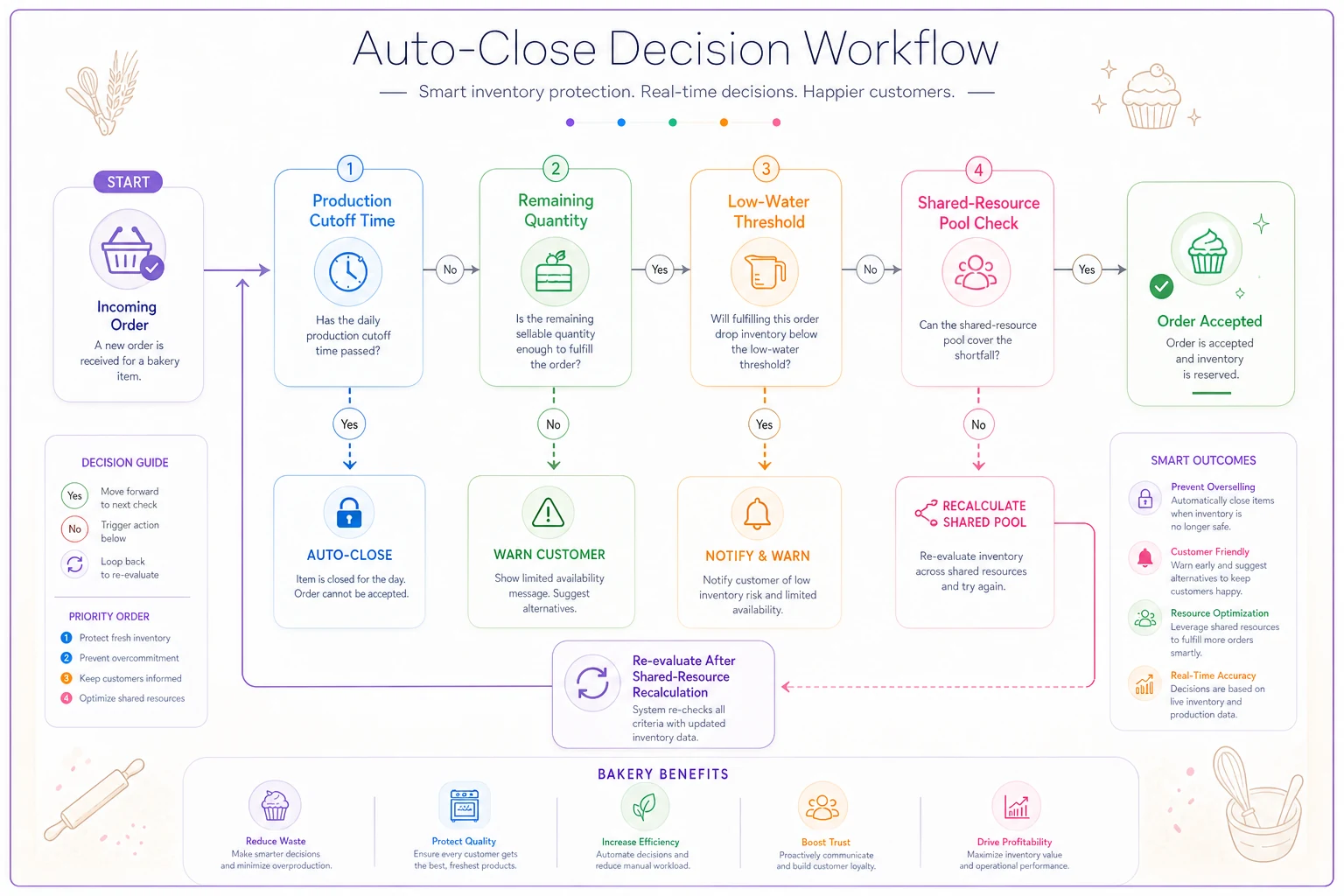
Here's the auto-close logic in order:
-
Check current time against the SKU's production cutoff. Past cutoff → close.
-
Check Remaining against zero. At or below → close.
-
Check Remaining against your low-water threshold. At or below → set to WARN and ping a human.
-
Check shared-resource pool (dough, butter, oven slots). If a linked SKU exhausted the shared pool → recalculate this SKU's ceiling and re-run steps 1–3.
Here's a simple flow of the auto-close checks.
The mistake that comes up most often: bakeries build rule 2 and skip rules 1 and 3. They handle "sold out" but not "too late to make" and not "linked item ate my capacity." Those two are where the ugly refunds come from, because the customer got a confirmation email and a charge for something that was never actually makeable.
The notification scripts (this is where trust is won or lost)
When the system closes something or catches a problem, someone needs to be told — and different situations need different messages. The tone matters more than people think. A promo refund handled well often keeps the customer; handled badly, it's a one-star review about being charged for cookies they never got.
Keep four scripts ready. They should fire based on the auto-close condition, not get written fresh each time under pressure.
Internal — capacity warning (to kitchen lead and whoever's running the promo): > "Almond croissant at 1 remaining of promo allocation. Auto-close pending. Confirm if we can add 5 to today's batch or let it close."
Customer — item just closed, order not affected (to browsers, not buyers): This is just the "Sold out — join the waitlist" state on the product page. No email needed. The flag flipped before they could check out, so there's nothing to apologize for.
Customer — order accepted but production caught a conflict: > "Hi [name] — quick heads up on your order [#]. We had unusually high demand on the [item] and can't get yours ready for your [date] pickup. We've refunded that item in full ([amount]) and the rest of your order is on track. As a sorry, here's [small credit/free add-on] for next time. Reply here if you'd rather swap it for [alternative]."
Customer — full preorder failure (whole order can't be fulfilled): > "Hi [name] — I'm sorry, we oversold [item] on this week's promo and can't fulfill order [#]. You've been fully refunded ([amount]) as of today. If you'd like, I can hold you a [alternative] for [date] at the promo price. Really sorry for the mix-up."
Two things that separate these from generic templates: the refund is stated as already done, not "will be processed," and there's always an offered alternative or credit. When the swap offer goes out within a couple hours of the promo — not the next day — a decent share of customers take it instead of the refund, and you keep the sale.
Reconciling the preorders that still slip through
No matter how tight the flags are, some orders will land in the gap — a race condition where two people check out on the last unit within the same second, a manual wholesale order that wasn't logged until after the promo, a cutoff that got extended by accident.
You need a reconciliation pass, and it should happen at a fixed time, not "whenever someone notices." The natural moment is right after the daily production plan locks — the same point you'd finalize batching in an end-to-end production system.
-
[ ] Pull all promo orders for the target production day.
-
[ ] Match each against the allocation sheet's committed capacity. Flag any SKU where sold online + committed + reserved > ceiling.
-
[ ] For over-allocated SKUs, sort orders by timestamp. Earliest orders are honored first.
-
[ ] Identify the overflow orders (the ones past the ceiling).
-
[ ] For each overflow order
attempt a same-SKU add to batch if the kitchen has slack. If not, trigger the appropriate refund/swap script.
-
[ ] Process refunds before the customer's expected pickup notification would go out — never let an unfulfillable order reach the "ready for pickup" stage.
-
[ ] Log the failure
SKU, count oversold, root cause (race, late wholesale, cutoff error). This log is what stops it next time.
That last step gets skipped constantly, and it's the most valuable one. If you look at the failure log after a month and see that most overselling traces back to late-logged wholesale orders, you don't have a website problem — you have a wholesale-entry timing problem, and no amount of flag tuning fixes it. The reconciliation log tells you where the drift is actually coming from.
A real scenario
A single-location bakery-café running weekly Tuesday email promos to roughly 4,000 subscribers. Their online store used static inventory counts, updated by hand on Monday nights.
Before: on a typical promo they'd oversell the headline item by 15–25 units. Most Tuesdays involved 20–30 refund and apology emails, written individually, usually mid-morning when the counter was slammed. They estimated they were losing somewhere between $200–$350 a week in refunds, comped alternatives, and lost repeat business — somewhere north of $10k a year once you factor in manager time.
After moving to an allocation sheet — ceiling minus committed minus reserved, flags reading Remaining, a hard time cutoff of 8pm Monday, and the four notification scripts — overselling on the headline item dropped to low single digits. The occasional genuine race condition, basically. The bulk of refund emails disappeared because the flag now closed before checkout instead of after. When something did slip through, the swap-offer script converted a meaningful chunk of would-be refunds into rebooked orders at full price. The manager got their Tuesday mornings back.
Nothing about their marketing changed. They didn't send fewer promos or sell less. They just stopped selling what they couldn't make.
When this makes sense — and when it's overkill
Worth building if you run recurring promos, have shared ingredients or oven constraints across SKUs, or sell the same production capacity across more than one channel (online + counter + wholesale). The more channels competing for one oven, the more you need allocation buckets.
Probably overkill if you only sell what's physically on the shelf, one channel, no preorders — then a plain inventory count is honestly fine, and this adds complexity you won't use.
Worth saying directly: if your problem is that you're underselling — capacity sitting idle, promos that don't move enough — don't start here. Allocation control is about stopping overpromising. It won't grow demand, and tightening flags on a slow SKU just leaves money on the table. Fix the demand problem first.
Start small
You don't need to wire everything up on day one. Build the allocation sheet for your top three promo SKUs only — the ones you've oversold before. Add the ceiling-minus-committed-minus-reserved math. Set the flag to read Remaining. Add a single time cutoff. Run it through one promo cycle and watch the reconciliation log.
Whether you manage this in a spreadsheet or in operational software that ties your online availability directly to your production plan, the underlying logic is identical. The value is in the rules, not the tooling. Get the allocation buckets, the auto-close conditions, and the notification scripts right, and overpromising mostly stops being a recurring problem. What's left is the occasional genuine race condition — handled cleanly, with a script already written — instead of forty apology emails on a Tuesday morning.
Build the allocation sheet for your top three promo SKUs only to keep the first rollout simple and focused.
Whether you manage this in a spreadsheet or in operational software that ties your online availability directly to your production plan, the underlying logic is identical. The value is in the rules, not the tooling. Get the allocation buckets, the auto-close conditions, and the notification scripts right, and overpromising mostly stops being a recurring problem. What's left is the occasional genuine race condition — handled cleanly, with a script already written — instead of forty apology emails on a Tuesday morning.
Whether you manage this in a spreadsheet or in operational software that ties your online availability directly to your production plan, the underlying logic is identical. The value is in the rules, not the tooling. Get the allocation buckets, the auto-close conditions, and the notification scripts right, and overpromising mostly stops being a recurring problem. What's left is the occasional genuine race condition — handled cleanly, with a script already written — instead of forty apology emails on a Tuesday morning.